MiniDisc for macOS
Put music back on MiniDisc.
Quri writes audio to Sony NetMD and Hi-MD recorders over USB — titled, track-marked and committed to the disc. Natively, on macOS, which Sony never shipped software for.
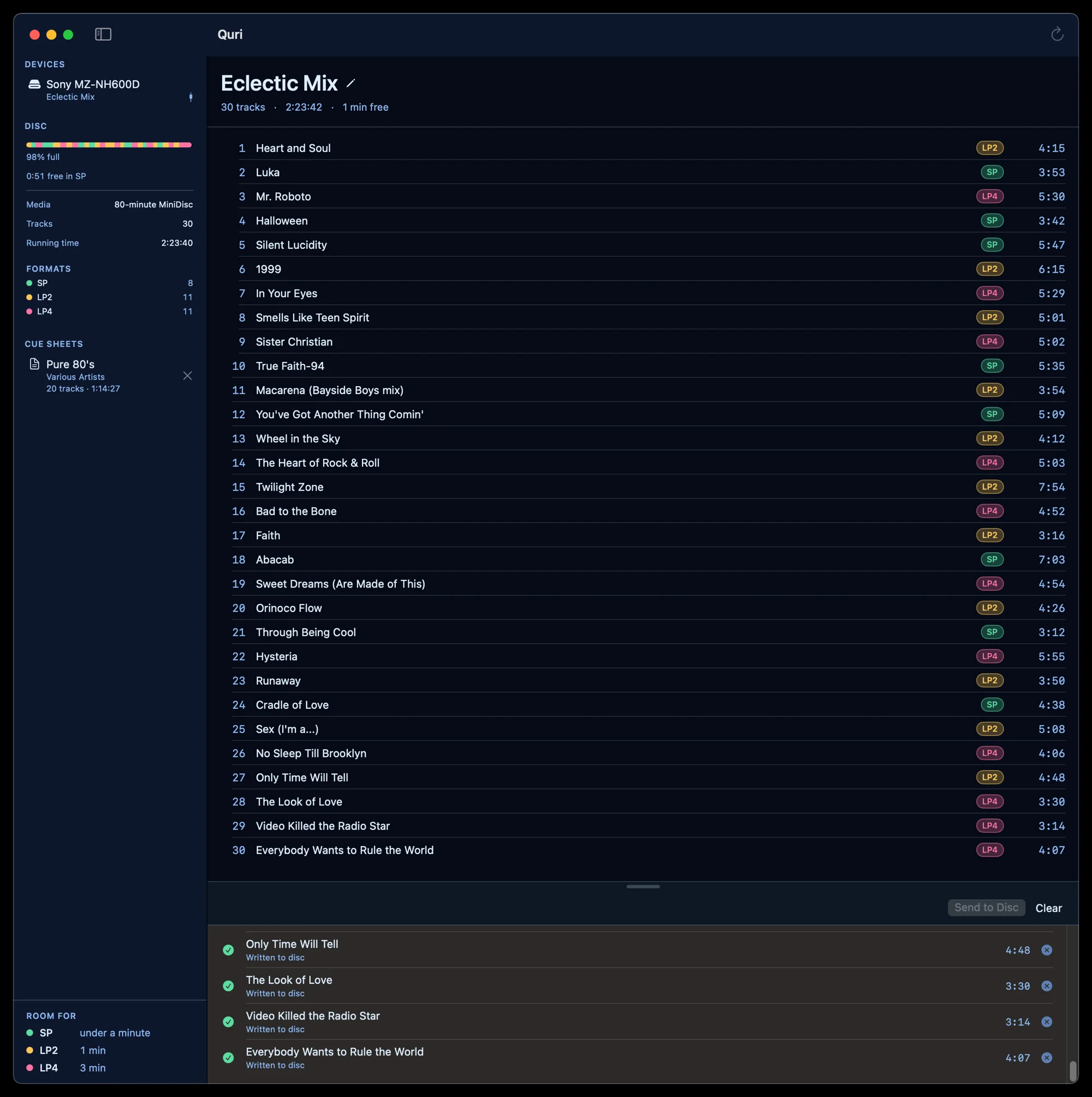
The recorders still work. The software didn’t.
SonicStage was Windows-only, is long discontinued, and was never pleasant even when it ran. The recorders are a different story: a NetMD portable from 2002 still spins up, still takes a disc, and still has a working USB port.
Quri talks to them directly. Native Swift, IOUSBHost, no kernel extension and nothing installed into the system — just an app that opens, finds the deck, and writes the disc.
Everything a disc needs, in one window.
No session to start, no library to import into, nothing to register.
Send a queue, not a file
Drop in a batch, choose SP, LP2 or LP4 per track, and watch each one land. Titles travel with the audio.
Both kinds of disc
Standard MiniDisc over NetMD, and Hi-MD over its own transport — reading, writing, titling and erasing on each.
Titles that survive the trip
Curly quotes and dashes are folded to ASCII before writing. Other software mangled them, which is how a disc here ends up reading Jangois Escape.
More than one recorder
Every attached deck in one sidebar, each with its disc, its free space and its battery level.
Straight from a CD
Read an audio CD, pull its titles, pick a quality, and send the whole thing to the disc without a file in between.
Know what fits
Remaining time in SP, LP2 and LP4 at once, so the question of what else will go on is already answered.
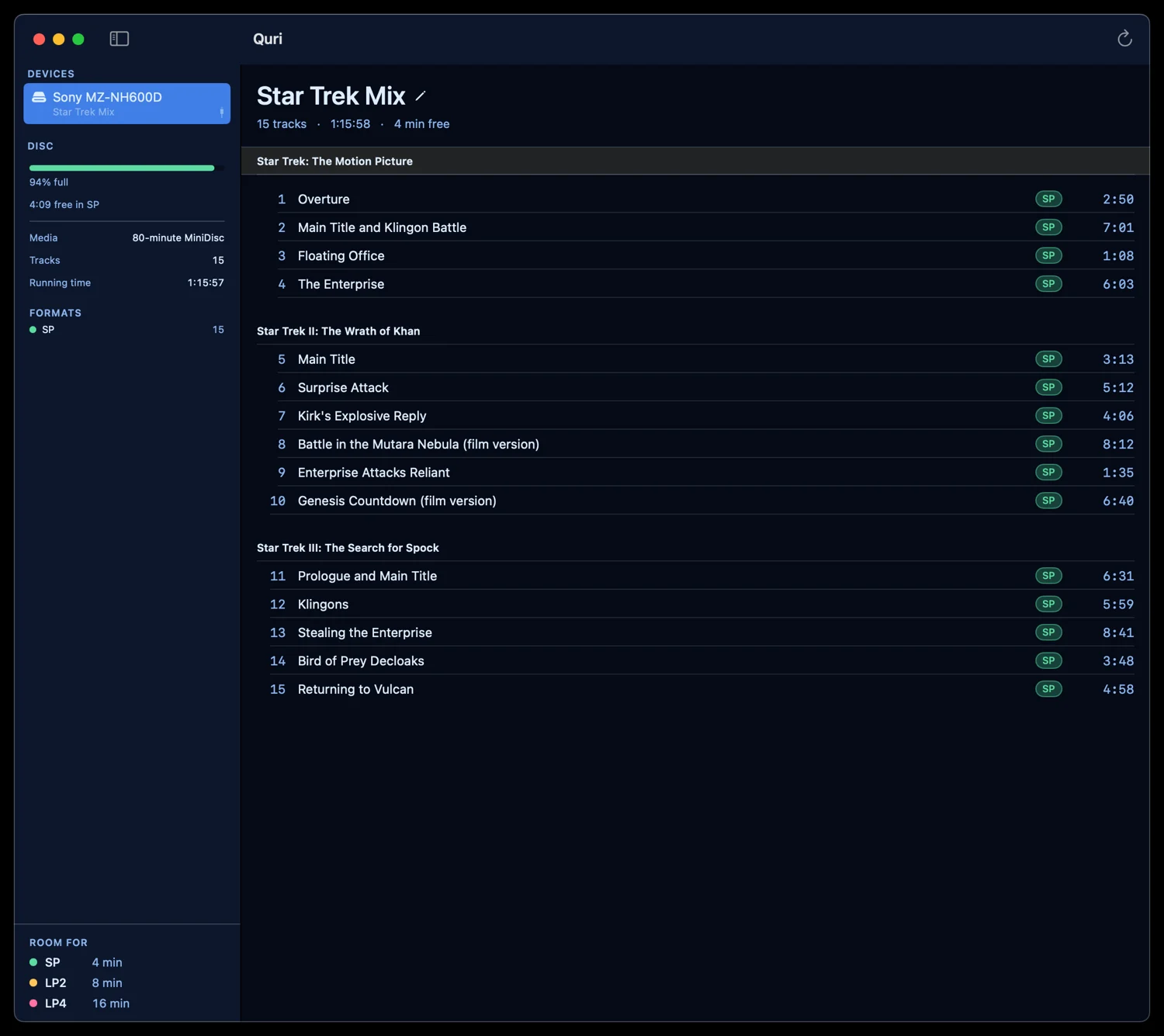
Albums arrive as albums.
A MiniDisc stores one flat list of tracks and a single string of titles. Quri reads the group syntax that convention layered on top of that, so a disc holding three records shows three records — and writes it back the same way.
Cue sheets stay in the sidebar, so the album you are part-way through putting on a disc is still there tomorrow.
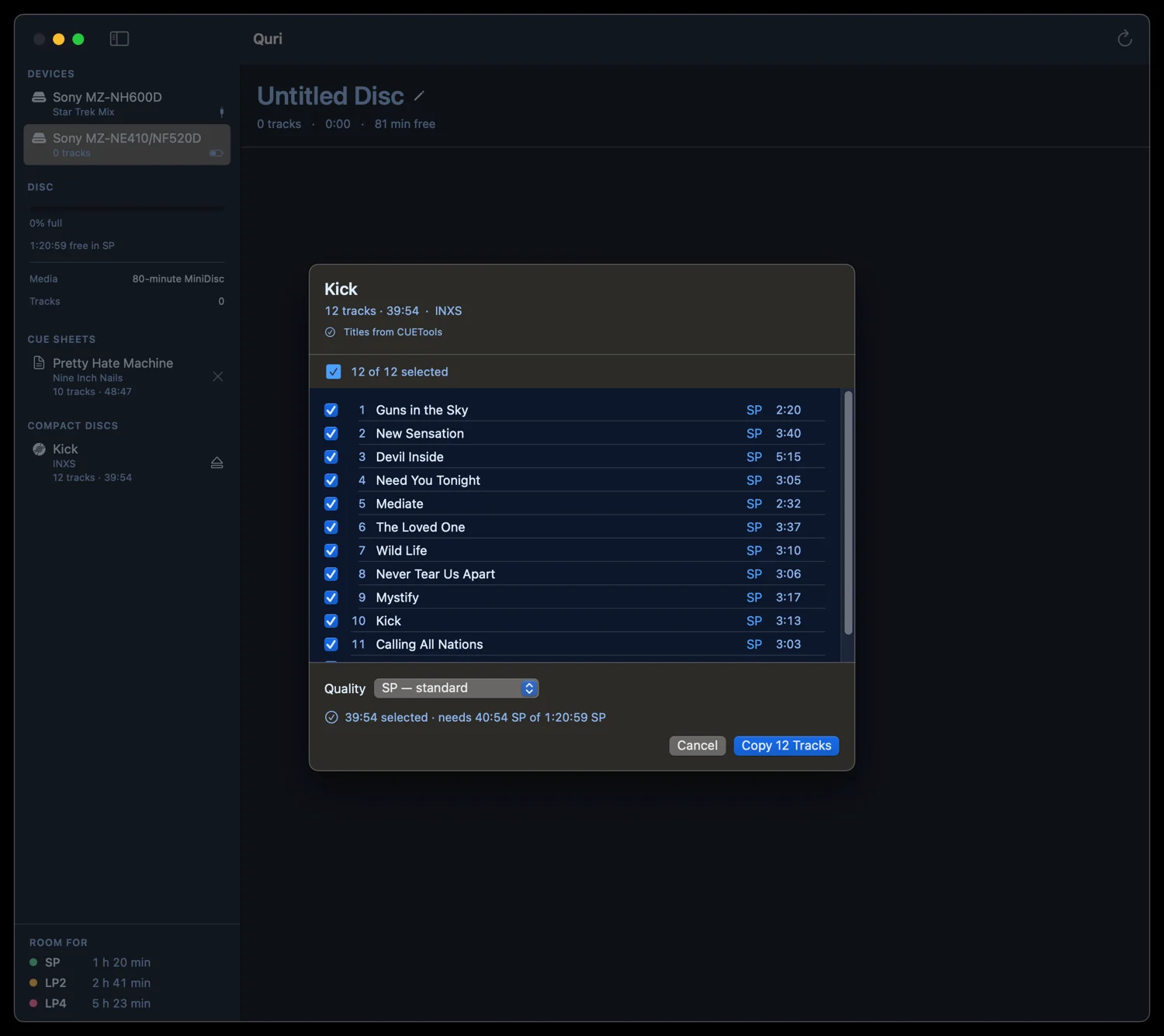
A CD in, a disc out.
Put an audio CD in a drive and Quri reads it directly: titles looked up, tracks listed, quality chosen once for the batch. Pick what goes on, and it tells you what the selection costs before anything is written.
No intermediate files, no import step, nothing left behind on the Mac afterwards.
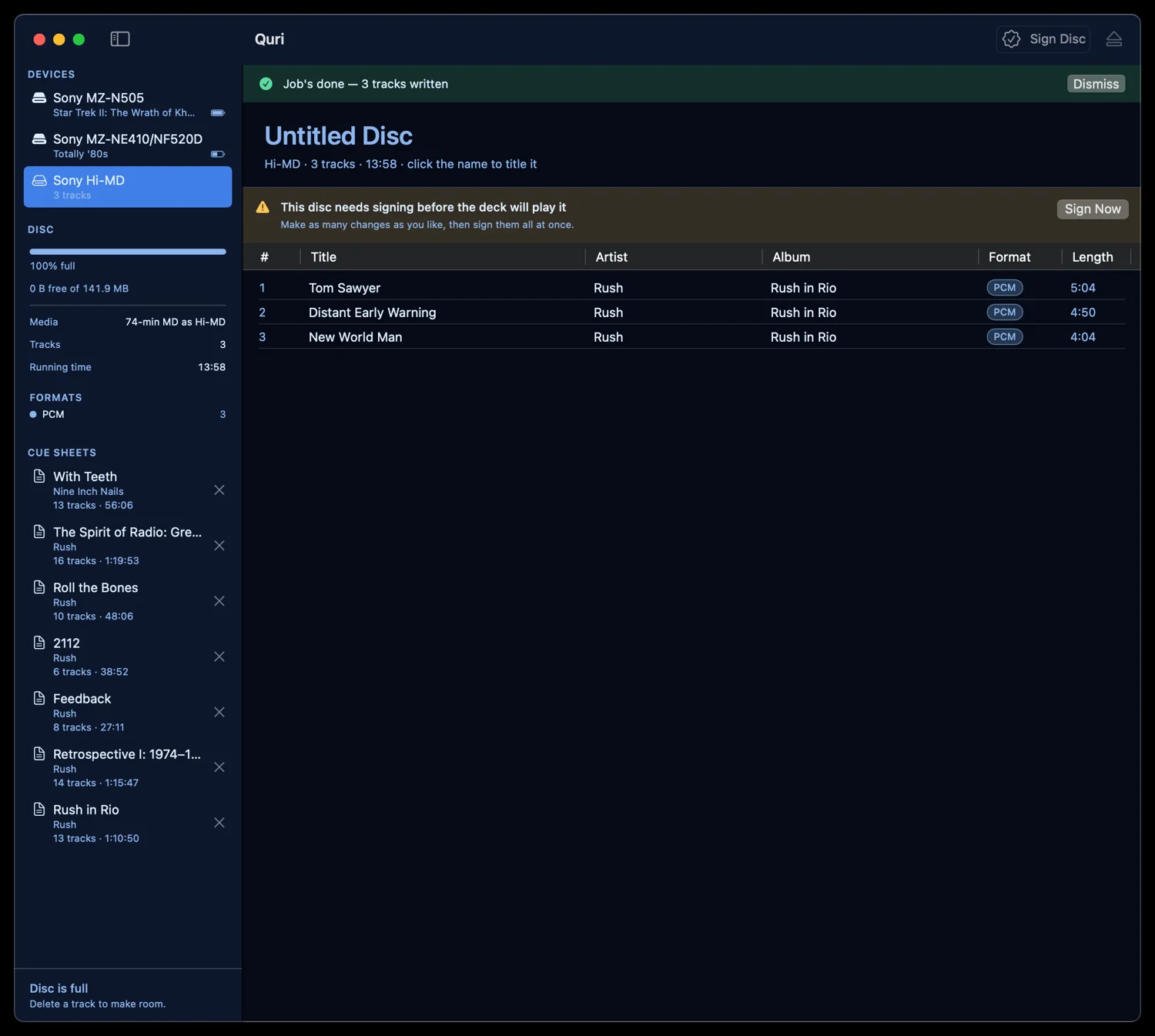
Hi-MD, signed when you’re ready.
A Hi-MD disc has to be signed before a deck will play what’s on it. Quri does not make you pay that cost per track: make as many changes as you like — add, retitle, delete — and sign them all at once when you’re done.
Uncompressed PCM, or ATRAC3 at either rate. The disc tells you which it’s holding.
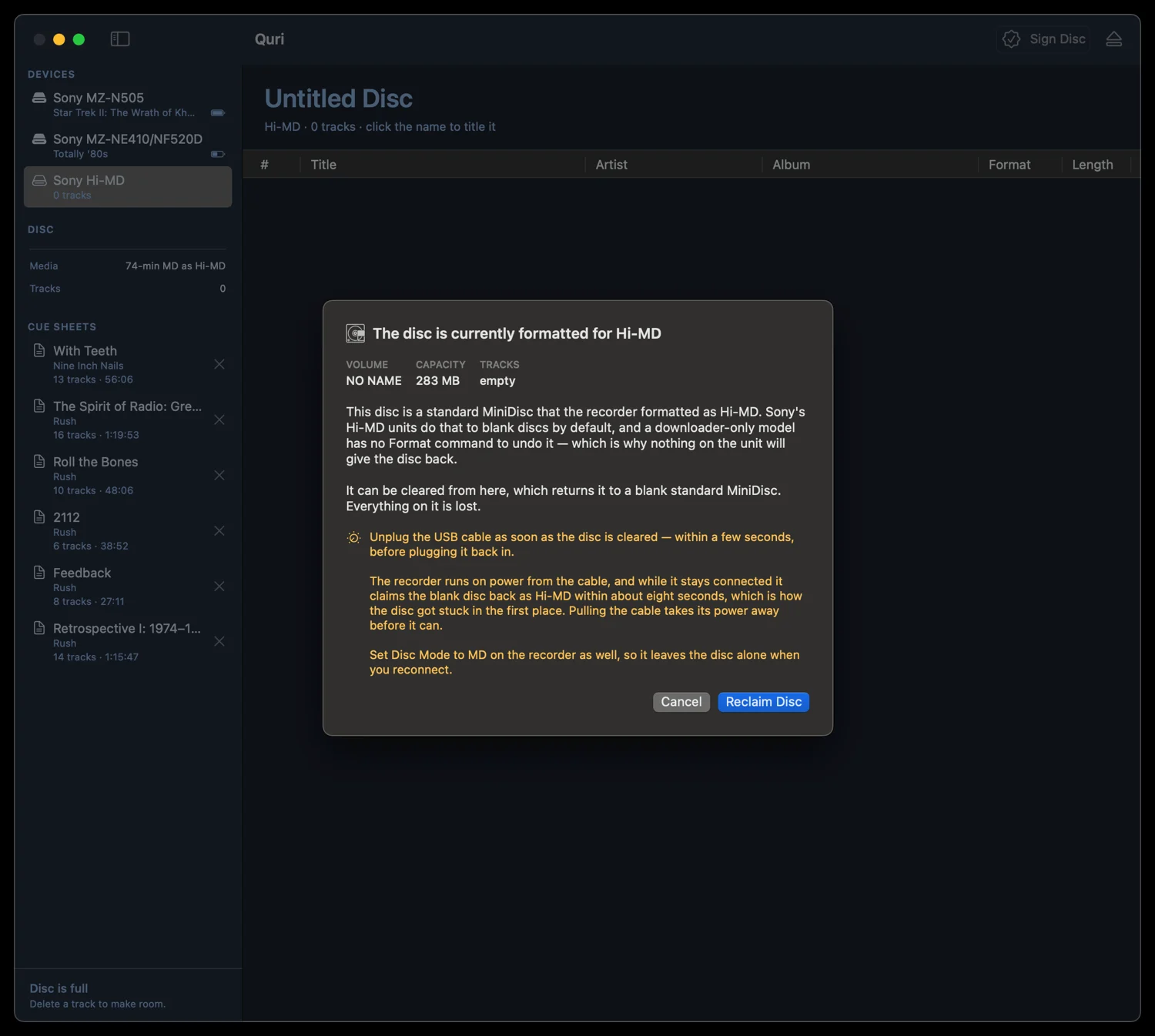
Get back the disc your recorder took.
Put a blank 80-minute MiniDisc into a Hi-MD portable and it will quietly format it as Hi-MD — 305 MB, unreadable in every other deck you own. On a downloader-only model there is no menu item to undo it, because those units were never meant to format anything themselves.
Quri sends the command that takes it back, and explains what is about to happen in the words you’d want before wiping a disc.
Four formats, chosen per track.
Running times are for a standard 80-minute disc. Mix them freely — Quri tracks what is left in each.
SP
80 minATRAC1, encoded by the recorder itself. The safe choice, and the one any MiniDisc deck ever made will play.
LP2
160 minATRAC3 at 132 kbps. Twice the disc, and genuinely hard to fault on headphones.
LP4
320 minATRAC3 at 66 kbps, joint stereo. Four times the disc — made for spoken word and long mixes.
PCM
Hi-MDUncompressed linear PCM, bit for bit with the source. Hi-MD discs and Hi-MD recorders only.
Careful with your discs.
A MiniDisc holds the only copy of whatever is on it. That shaped how this was built.
- Nothing runs in the kernel. USB goes through IOUSBHost in userspace. There is no kernel extension, so nothing here can take the machine down with it.
- Reading never writes. A disc is read exactly as found, however malformed its table of contents turns out to be. Only an operation you asked for changes anything on it.
- Unplugging is handled. The session hears from IOKit the moment a recorder is pulled, rather than inferring it from a transfer that fails half a second later. Every transfer checks first.
- Nothing waits forever. Every transfer carries a real timeout, and both of the ways a deck stalls — no reply, and an explicit “still working” — back off against a bounded attempt count.
- A wedged deck gets cleared. Secure-session state lives in the recorder’s firmware and survives a USB reset, so another program can leave it stuck. Quri clears it and retries without bothering you — and when it can’t, it says exactly what to unplug.
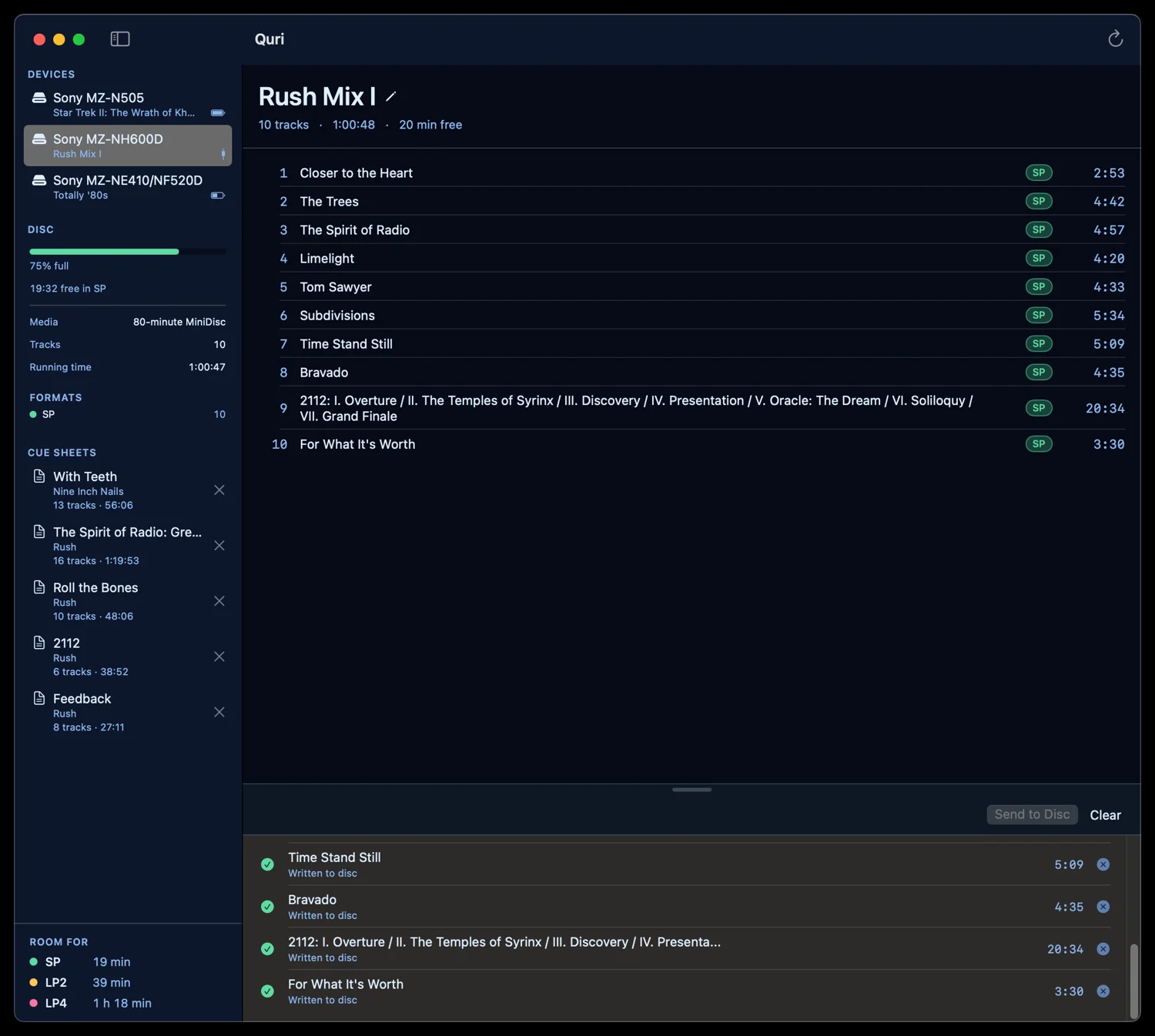
What it runs on.
Verified against a Sony MZ-NH600D, where every write path has been exercised on real hardware — rename a disc, rename a track, move, erase, download — and the disc read back byte-identical to how it started.
Other Sony NetMD and Hi-MD portables share the same command set and are expected to work. Where a model differs, it differs in a small table of addresses that has to be derived per model; several are already in. If yours does something unexpected, that is worth hearing about.
Writing.
Notes from building it: what the hardware actually does, and what it took to find out.
-
Hello world!
Welcome to WordPress. This is your first post. Edit or delete it, then start writing!
Not ready to download yet.
Quri writes discs on real hardware today, but it isn’t packaged for anyone else to install. When there is something to download, it will be here.
In development